Ship more video with half the chaos.
DropIn gives video-first teams one place to plan ideas, upload raw footage, manage edits and approvals, and publish to every platform from a single dashboard.
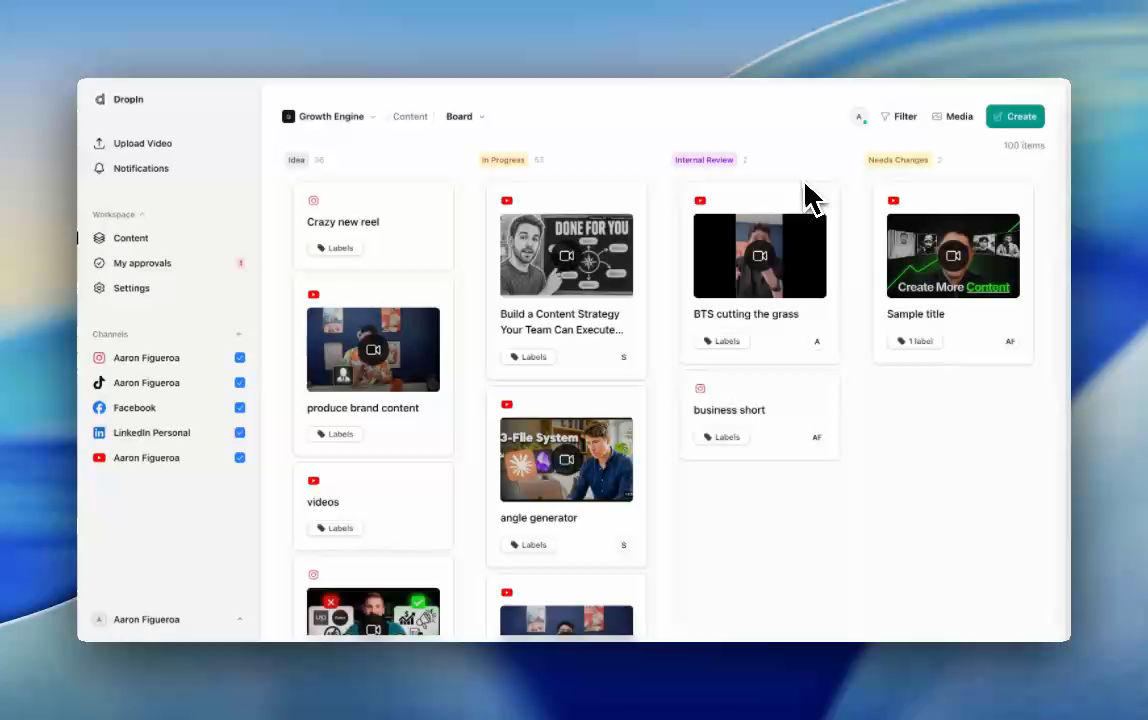










Shorts. Longs. Reels. Posts.
Start free trialTry Pro or monthly Scale for 10 days and pay $0 today. Annual Scale is charged immediately.
Built for content leads at agencies and personal brand teams tired of juggling Notion, Drive, Dropbox, and Sheets.
Who it is for
Built for real content teams, not hobby creators.
DropIn is for teams who live in Notion, Drive, and Dropbox all day just to keep videos moving.
Agency content leads
Manage multiple personal brands without rebuilding the same messy workflow for every client.
In-house media teams
Run a founder's YouTube, shorts, and socials from one shared production system.
Creators with editors
If you already hand off footage and want less status-chasing, DropIn gives you the pipeline.
Before and after
From scattered tools to one production workspace.
Without DropIn
- Ideas in Notion, scripts in Docs, files in random Drive or Dropbox folders
- Editors chasing links across Slack, email, and DMs
- Approvals lost in WhatsApp threads and email replies
- 5 platforms means 25+ manual uploads for every batch
With DropIn
- Ideas, scripts, briefs, and files live on one shared board
- Editors upload cuts directly to the card with version history
- Clear approval lanes: auto-post, team-approve, or founder-only
- Publish everywhere from one calendar view
Product tour
One board, every step of your video workflow.
01
Capture and organize
Dump ideas, scripts, and briefs into one inbox. Tag by client, platform, or series so nothing gets lost.
02
Edit and review
Upload raw footage, assign cards to editors, track status, and leave timestamped comments on each version until it is approved.
03
Schedule and publish
Publish approved videos to multiple platforms from one calendar, with platform-specific titles, descriptions, and tags.
Publish everywhere
Simple pricing
Unlimited posts on Pro and Scale.
Pro is $39 per purchased seat each month. Pro includes 2 workspaces and 10 connected channels organization-wide. Scale is $599 monthly or $5,988 annually ($499/month equivalent) with unlimited seats, unlimited workspaces, and unlimited connected channels.
See plansNot another scheduler
DropIn is your production workspace, not just a scheduler.
Before publishing
Handles raw footage, scripts, edits, and approvals before anything goes live.
Replaces the mess
Replaces Notion, Drive, Dropbox, and random folders as the operating layer for video ops.
Built for operators
Made for content leads and editors, not just social managers watching metrics.
If you only need a tool to queue up posts and read comments, use Hootsuite. If you are drowning in files, edits, and approvals before anything goes live, DropIn is for you.
Frequently asked questions
How it works
Which platforms can you publish to?
How does DropIn match my raw clips to the right script?
Can I make vertical clips for Shorts, Reels, and TikTok?
How do approvals and client review work?
Can I invite my editors and clients?
Does DropIn replace Notion, Drive, or Dropbox?
Plans, trial & billing
Do I need a credit card to start?
How much storage do I get, and how long is footage kept?
Is there a limit on how much I can post?
Can I pay for Scale monthly?
What happens to my data if I cancel?
Is DropIn right for me?
Is this good for solo creators?
Who is DropIn a bad fit for?
Ready to cut your content chaos in half?
Start a 10-day trial on Pro or monthly Scale and pay $0 today. Annual Scale is charged immediately.
Start free trial Or book a live walkthrough.